

Every day, millions of people spend hours staring at computer screens, smartphones, and tablets. This constant exposure creates a modern health challenge. Your eyes work harder when viewing digital devices compared to reading printed materials. The result is often discomfort, vision problems, and reduced productivity.

Digital eye strain affects up to 70 percent of people who regularly use computers. This condition goes by several names. Medical professionals call it computer vision syndrome. The symptoms are real and can significantly impact your daily life. Understanding how to protect your eyes from screen fatigue is essential in our digital world.
This guide provides comprehensive information about digital eye strain relief. You will learn the causes, recognize symptoms early, and discover practical prevention methods. We will explore both simple lifestyle changes and professional treatment options. Your eye health matters, and taking action now can prevent long-term vision problems.
Understanding Digital Eye Strain
Digital eye strain, also known as computer vision syndrome, occurs when your eyes become tired from intense use of digital devices. The condition results from prolonged exposure to screens without adequate breaks. Many people experience this modern ailment without fully understanding its causes.
Your eyes must work harder when viewing digital screens. Unlike printed pages, digital displays emit blue light and often have glare. The contrast between text and background may be insufficient. These factors combine to stress your visual system.
Computer vision syndrome affects people of all ages. Office workers face particular risk due to extended screen time. Students using tablets and laptops for hours each day also develop symptoms. Even casual device users can experience discomfort after prolonged use.
How Digital Screens Affect Your Eyes
When you stare at a screen, your blink rate decreases significantly. Normal blinking occurs about 15 times per minute. During screen time, this rate can drop to just 5 blinks per minute. Reduced blinking leads to dry eye symptoms and irritation.
Digital devices require your eyes to focus and refocus constantly. This continuous adjustment strains the eye muscles. The ciliary muscles inside your eyes work overtime to maintain clear vision. Over time, this sustained effort causes fatigue and discomfort.
Screen Time Statistics
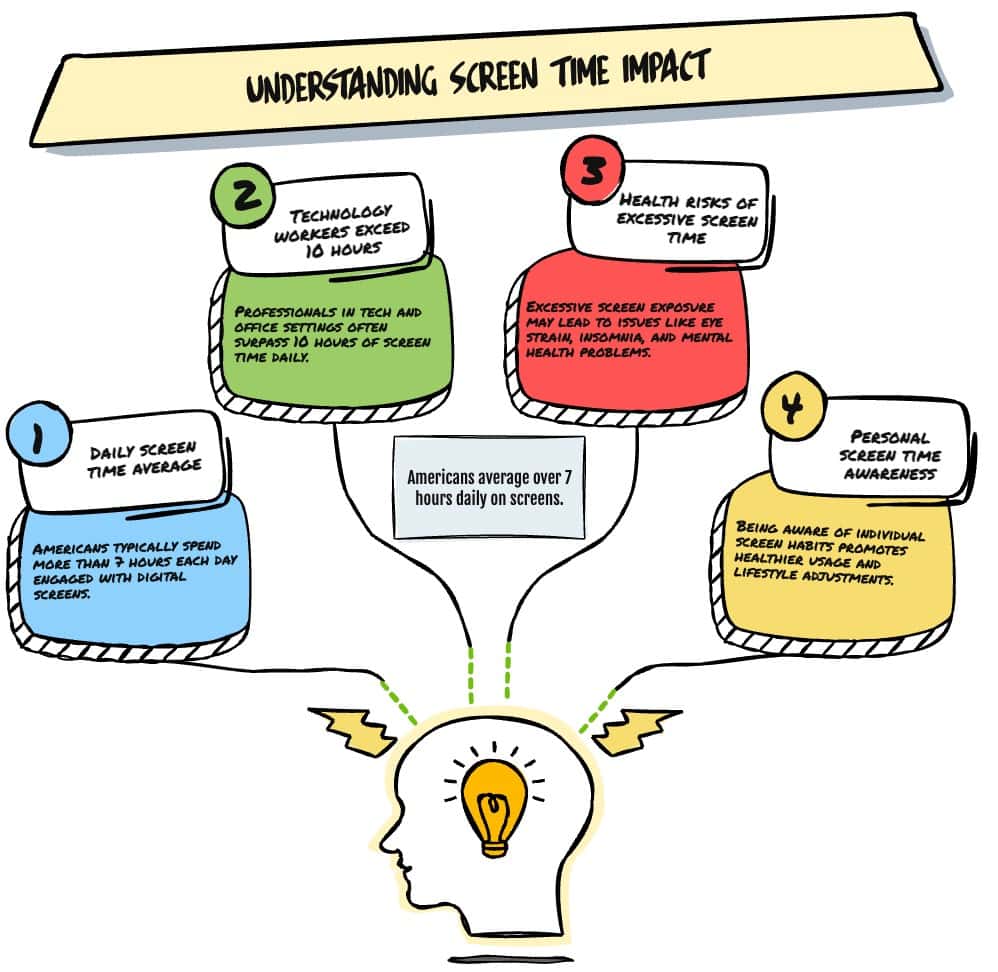
The average American spends over 7 hours per day looking at screens. This includes computers, smartphones, tablets, and televisions. Workers in technology and office environments may exceed 10 hours of daily screen time. Understanding your personal screen exposure helps you take appropriate preventive measures.
Common Symptoms of Digital Eye Strain
Recognizing the symptoms of digital eye strain early helps you take corrective action. Many people dismiss these signs as temporary tiredness. However, persistent symptoms indicate your eyes need relief and possibly professional care.
Physical Eye Symptoms
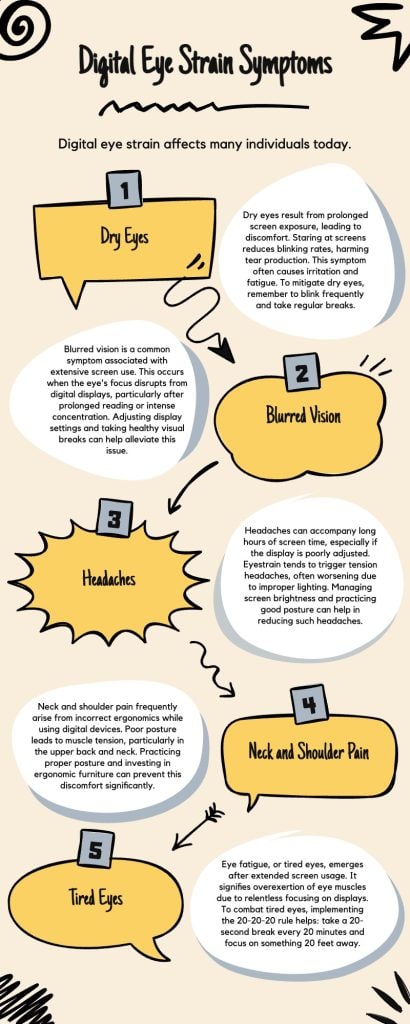
The most common physical symptoms affect your eyes directly. You may notice your eyes feel tired or heavy, especially after several hours of screen time. This eye fatigue intensifies as the day progresses. Resting your eyes provides temporary relief, but symptoms return quickly.
Dry eye is another frequent complaint among people with computer vision syndrome. Your eyes may feel scratchy or gritty. You might experience a burning sensation. Some people notice excessive tearing, which seems counterintuitive but occurs as your eyes try to compensate for dryness.
- Blurred vision that comes and goes throughout the day
- Double vision when looking at screens or immediately after
- Red, irritated eyes with visible blood vessels
- Increased sensitivity to light from screens and overhead lighting
- Difficulty focusing when switching between screen and distant objects
Associated Physical Discomfort
Digital eye strain symptoms extend beyond your eyes. Headaches frequently accompany eye fatigue. These headaches typically develop around your temples or forehead. The pain may be dull and persistent or sharp and intermittent.
Neck and shoulder pain often result from poor posture during screen use. You may lean forward to see the screen more clearly. This position strains muscles in your neck, shoulders, and upper back. Over time, this discomfort becomes chronic without intervention.
Back pain develops when you sit incorrectly for extended periods. Slouching or sitting without proper lumbar support stresses your spine. These posture problems compound the vision-related symptoms of digital eye strain.
When to Seek Professional Care
Some symptoms require immediate attention from an eye care professional. Contact your doctor if you experience sudden vision changes, persistent double vision, or eye pain that does not improve with rest. Regular comprehensive eye exams help detect underlying conditions. Learn more about what to expect during an eye exam to prepare for your visit.
Causes and Risk Factors of Digital Eye Strain
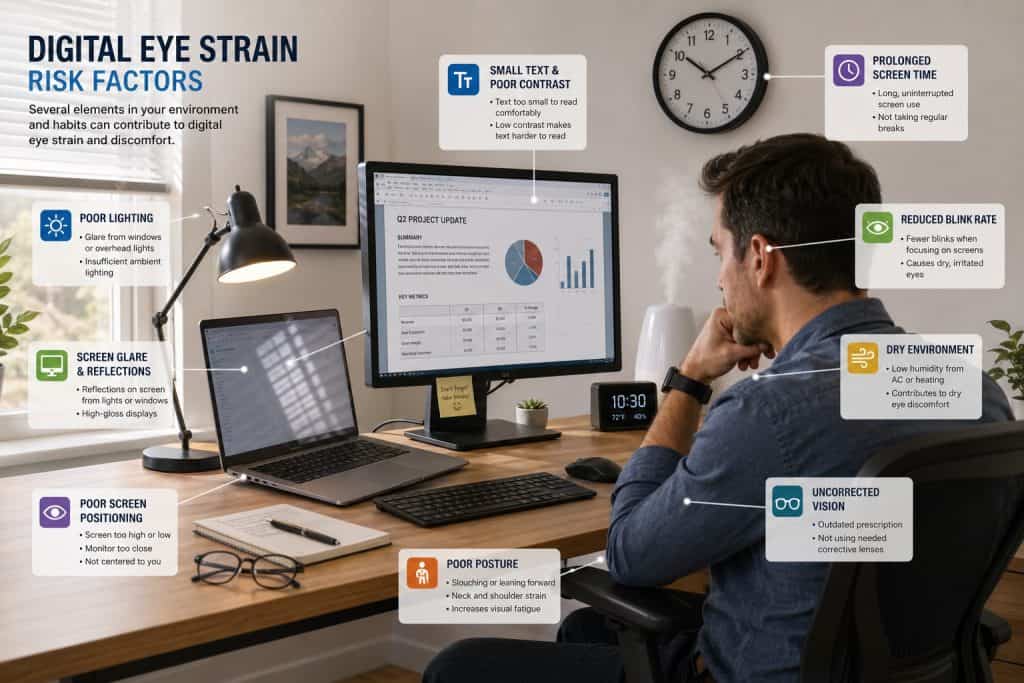
Understanding what causes digital eye strain helps you make informed decisions about prevention. Multiple factors contribute to computer vision syndrome. Some elements relate to how you use devices, while others involve your environment and existing vision problems.
Device-Related Factors
The characteristics of your digital device directly impact eye strain. Screen quality matters significantly. Older monitors with lower resolution force your eyes to work harder to distinguish text and images. Flickering screens, even subtle flicker invisible to conscious perception, strain your visual system.
Screen brightness and contrast settings affect how much your eyes must strain. A screen that is too bright or too dim compared to ambient light creates stress. Poor contrast between text and background makes reading difficult. Your eyes constantly adjust to compensate for these inadequacies.
Screen Position Problems
- Monitor placed too close (less than 20 inches away)
- Screen positioned at incorrect height (above eye level)
- Viewing angle that causes neck strain
- Multiple monitors at different distances
Environmental Issues
- Harsh overhead lighting creating screen glare
- Windows behind or in front of monitor
- Insufficient ambient room lighting
- Poor air quality causing dry eye
Personal Risk Factors
Your individual characteristics and habits influence susceptibility to digital eye strain. Age plays a role because vision changes naturally over time. People over 40 often develop presbyopia, making it harder to focus on close objects like computer screens.
Existing vision problems increase your risk of computer vision syndrome. Uncorrected refractive errors like nearsightedness or farsightedness strain your eyes further during screen use. Even minor prescription changes can cause significant discomfort during extended device use.
Vision Conditions
Undiagnosed or uncorrected refractive errors require constant visual compensation. Astigmatism causes particular difficulty with screen viewing. Binocular vision problems affect how your eyes work together.
Health Conditions
Certain medical conditions increase dry eye risk. Diabetes affects tear production and eye health. Thyroid problems can impact eye moisture. Medications may reduce tear production.
Lifestyle Factors
Insufficient sleep affects eye health significantly. Dehydration reduces tear production. Poor nutrition impacts overall vision. Smoking damages blood vessels in eyes.
Contact lenses can contribute to digital eye strain. Lenses reduce oxygen flow to your cornea. During screen time, decreased blinking further limits moisture. This combination often causes discomfort. Many contact lens wearers benefit from switching to glasses during extended computer use.
Understand Your Eye Health Better
A comprehensive eye examination can identify underlying causes of your digital eye strain. Early detection of vision problems helps prevent worsening symptoms. Professional guidance ensures you receive appropriate treatment and recommendations for your specific situation.
Effective Prevention Strategies for Digital Eye Strain Relief
Preventing digital eye strain requires a multifaceted approach. Simple changes to your work habits and environment provide significant relief. Implementing these strategies reduces symptoms and protects your long-term vision health.

The 20-20-20 Rule
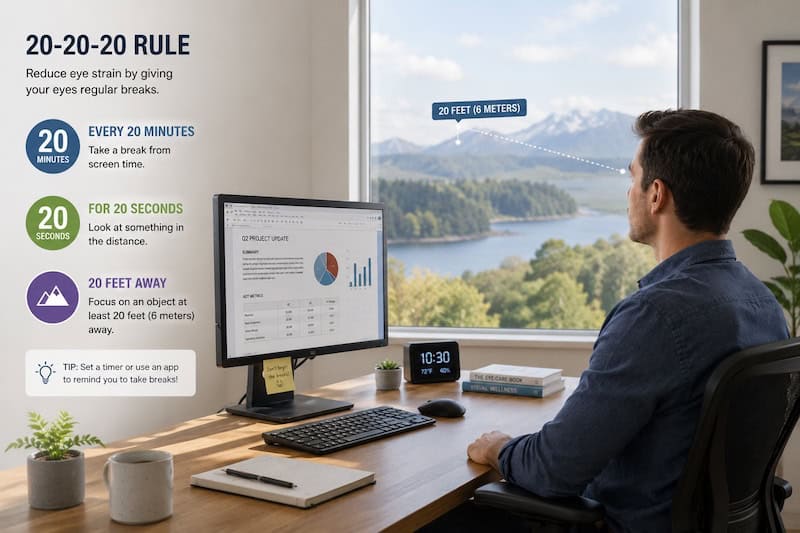
The 20-20-20 rule is the most widely recommended technique for digital eye strain relief. Every 20 minutes, look at something 20 feet away for at least 20 seconds. This simple practice gives your eye muscles a chance to relax and refocus.
Your ciliary muscles maintain constant tension when viewing close objects. Looking at distant objects allows these muscles to rest. The 20 feet distance is sufficient to achieve this relaxation. Setting a timer or using reminder apps helps you maintain this habit consistently.
How to Implement the 20-20-20 Rule
- Set a timer or download a reminder app for 20-minute intervals
- When the timer sounds, immediately look away from your screen
- Focus on an object at least 20 feet away (across the room or out a window)
- Maintain focus on the distant object for 20 full seconds
- Blink several times before returning to your screen
- Repeat this cycle throughout your workday
Optimize Your Workspace
Your physical workspace setup significantly impacts eye strain. Screen position is critical for comfort. Place your monitor directly in front of you, about an arm’s length away. The top of your screen should be at or slightly below eye level. This position reduces neck strain and maintains proper viewing angle.
Lighting in your workspace requires careful attention. Position your screen perpendicular to windows to minimize glare. Avoid placing monitors directly in front of or behind windows. Use blinds or curtains to control natural light. Overhead lighting should illuminate your space without creating reflections on your screen.
Optimal Workspace Setup
- Monitor 20-26 inches from eyes
- Screen center 15-20 degrees below eye level
- Indirect lighting reducing glare
- Anti-glare screen filter installed
- Adjustable chair supporting lower back
- Feet flat on floor or footrest
- Documents at same height as screen
Common Setup Mistakes
- Screen too close or too far away
- Monitor positioned too high or low
- Direct light shining on screen
- Bright window behind monitor
- Poor seating without back support
- Hunched posture leaning forward
- Twisted body position to view screen
Adjust Display Settings
Screen settings dramatically affect eye comfort. Brightness should match your surrounding environment. A screen that is too bright strains your eyes in dim conditions. A screen that is too dim forces your eyes to work harder in bright conditions. Adjust brightness throughout the day as lighting changes.
Text size and contrast deserve attention. Increase font size if you find yourself leaning forward to read. Black text on a white background provides optimal contrast for most people. Some individuals prefer reducing brightness of white backgrounds slightly to decrease glare.
- Set color temperature to warmer tones during evening hours
- Enable blue light filtering features on devices
- Adjust refresh rate to highest setting your monitor supports
- Increase text size to comfortable reading level
- Clean your screen regularly to remove dust and smudges
Practice Good Eye Care Habits
Simple eye care habits provide significant digital eye strain relief. Blinking consciously during screen time combats dry eye symptoms. Make a deliberate effort to blink completely and regularly. Incomplete blinks do not adequately moisturize your eyes.
Taking regular breaks beyond the 20-20-20 rule helps prevent cumulative strain. Stand up and move around every hour. Walk away from your desk. This practice benefits your entire body, not just your eyes. Blood circulation improves, reducing fatigue throughout your system.
Daily Eye Care Routine
Start your day by ensuring adequate sleep. Your eyes need 7-8 hours of rest to function optimally. Stay hydrated throughout the day. Drink water regularly to maintain tear production. Use artificial tears if you experience persistent dryness.
During Screen Time
Position reference materials close to your screen at similar distance. This reduces how much your eyes must refocus. Use a document holder if you reference papers frequently. Keep your screen clean and free from fingerprints or dust that reduce clarity.
Treatment Solutions for Digital Eye Strain
When prevention strategies alone do not provide sufficient digital eye strain relief, various treatment options can help. Professional guidance ensures you receive appropriate care for your specific symptoms and underlying conditions.

Computer Glasses and Contact Lenses
Computer glasses are specifically designed for the viewing distance of digital screens. Unlike regular prescription glasses optimized for distance vision, computer glasses focus on the intermediate range of 20-26 inches. These specialized glasses reduce the accommodation effort your eyes must make.
Anti-reflective coating on glasses reduces glare from screens and overhead lighting. This coating is essential for computer use. It minimizes reflections that force your eyes to work harder. Many people find this coating provides immediate relief from eye strain symptoms.
If you wear contact lenses, consider specialized options for computer use. Some lenses are designed specifically for people who spend significant time viewing screens. Discuss options with your eye care professional. You may benefit from switching to glasses during extended computer sessions.
Prescription Eye Drops and Artificial Tears
Artificial tears provide relief for dry eye symptoms associated with digital eye strain. Over-the-counter lubricating drops supplement your natural tears. Use preservative-free formulations if you need to apply drops frequently throughout the day.
For more severe dry eye symptoms, prescription medications may be necessary. Your eye doctor can prescribe drops that increase tear production. These medications treat the underlying cause of dryness rather than just providing temporary moisture.
Using Eye Drops Effectively
Apply artificial tears before starting prolonged screen time. This proactive approach prevents symptoms rather than just treating them. Reapply drops during breaks throughout the day. Keep a bottle at your workspace for easy access. Store drops according to package instructions to maintain effectiveness.
Vision Therapy and Eye Exercises
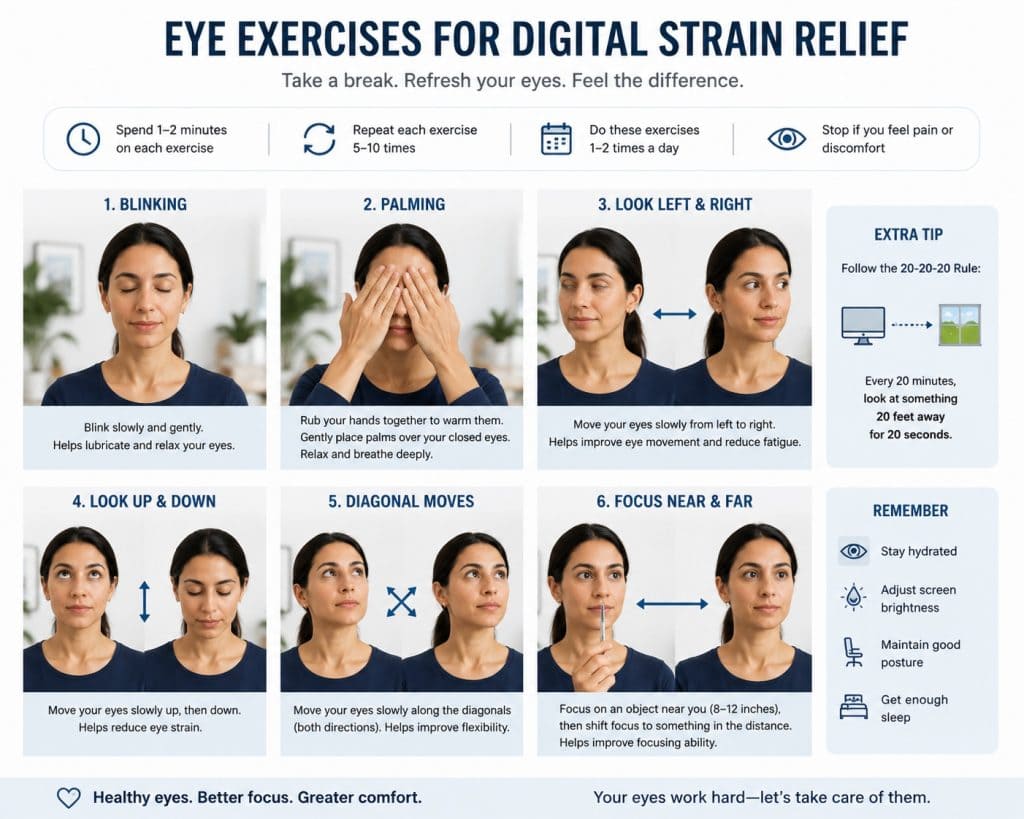
Vision therapy can strengthen eye muscles and improve coordination between your eyes. This treatment is particularly helpful for people with binocular vision problems. An eye care professional supervises therapy sessions and provides exercises to practice at home.
Simple eye exercises can supplement professional treatment. Focusing exercises train your eyes to switch between near and far objects smoothly. Palming exercises involve covering closed eyes with your palms, creating darkness that allows complete relaxation.
Advanced Treatment Options
For persistent cases unresponsive to conventional treatments, advanced options exist. Intense pulsed light therapy treats certain types of dry eye associated with meibomian gland dysfunction. This procedure stimulates oil glands in your eyelids, improving tear film quality.
Punctal plugs are tiny devices inserted into tear ducts to reduce tear drainage. By keeping tears on your eye surface longer, these plugs provide lasting relief for chronic dry eye. Your doctor determines if this option suits your condition.
Long-term eye health requires attention beyond immediate symptom relief. Conditions like cataract problems can develop over time with prolonged UV and blue light exposure. Protecting your eyes now helps prevent serious vision problems later in life.
Lifestyle Adjustments for Long-Term Eye Health
Sustainable digital eye strain relief requires lifestyle changes beyond immediate workplace modifications. Your overall health significantly impacts eye comfort and vision quality. Implementing these adjustments protects your eyes for years to come.
Nutrition for Eye Health
Proper nutrition supports healthy vision and reduces digital eye strain symptoms. Omega-3 fatty acids play a crucial role in maintaining tear film quality. These essential fats reduce inflammation and support the oil glands in your eyelids. Include fatty fish like salmon, sardines, or mackerel in your diet twice per week.
Vitamins and minerals specifically benefit eye health. Vitamin A supports overall vision function. Lutein and zeaxanthin filter harmful blue light from digital screens. Vitamin C and E provide antioxidant protection. A balanced diet rich in colorful vegetables provides these essential nutrients.
- Leafy green vegetables like spinach and kale contain lutein and zeaxanthin
- Orange vegetables and fruits provide beta-carotene and vitamin A
- Nuts and seeds supply vitamin E and omega-3 fatty acids
- Citrus fruits deliver vitamin C for antioxidant protection
- Eggs contain multiple eye-healthy nutrients in bioavailable forms
Sleep and Screen Time Management
Quality sleep is fundamental for eye health and digital eye strain relief. During sleep, your eyes rest and repair themselves. Aim for seven to eight hours of sleep each night. Establish a consistent sleep schedule to maintain your body’s natural rhythms.
Reduce screen time before bed to improve sleep quality. Blue light from devices suppresses melatonin production, making it harder to fall asleep. Stop using screens at least one hour before bedtime. If evening device use is unavoidable, use blue light filters or night mode settings.
Evening Screen Time Guidelines
Gradually reduce screen brightness as evening approaches. Enable night shift or blue light filter modes on all devices. Consider using amber-tinted glasses in the evening to block blue light. These glasses allow device use while minimizing sleep disruption.
If you must work in the evening, take more frequent breaks. Your eyes tire more quickly later in the day. The 20-20-20 rule becomes even more important during these hours. Ensure your workspace has adequate lighting to reduce contrast between screen and surroundings.

Regular Physical Activity
Exercise improves blood circulation throughout your body, including your eyes. Better circulation delivers more oxygen and nutrients to ocular tissues. Physical activity also helps reduce the stress and tension that exacerbate eye strain symptoms.
Neck and shoulder exercises are particularly beneficial for people who spend hours at computers. Tight neck muscles can restrict blood flow to your head and eyes. Simple stretches and movements throughout the day prevent muscle tension and improve overall comfort during screen time.
Neck Stretches
Slowly turn your head side to side, holding each position for 10 seconds. Tilt your head toward each shoulder. Roll shoulders backward and forward to release tension.
Upper Body Movement
Stand and reach arms overhead, stretching your spine. Twist your torso gently side to side. Do arm circles to improve circulation in shoulders and neck.
Walking Breaks
Take short walks every hour away from your desk. Walk outside if possible to give your eyes a break from indoor lighting and screens. This movement benefits your entire body.
Stress Management
Stress intensifies physical symptoms of digital eye strain. When you feel stressed, you may squint more, clench your jaw, or tense your facial muscles. These reactions worsen eye fatigue and headaches. Managing stress provides comprehensive relief.
Practice relaxation techniques throughout your workday. Deep breathing exercises calm your nervous system. Take a few minutes each hour to breathe slowly and deliberately. This practice reduces overall tension, including strain around your eyes.
Mindfulness and meditation offer long-term stress relief benefits. Even brief meditation sessions help you reset and refocus. Many apps provide guided meditations specifically designed for workplace stress. Regular practice improves your resilience to daily pressures.
When to Seek Professional Help
While many cases of digital eye strain respond well to self-care measures, certain situations require professional evaluation. Knowing when to schedule an appointment ensures you receive appropriate care before symptoms worsen or indicate more serious problems.

Warning Signs Requiring Immediate Attention
Some symptoms indicate potential problems beyond simple digital eye strain. Sudden changes in vision require prompt evaluation. If you notice sudden blurriness that does not improve with rest, contact your eye doctor immediately. Persistent double vision, especially if new, warrants urgent assessment.
Eye pain that continues despite rest and preventive measures needs professional evaluation. Severe headaches accompanied by vision changes may indicate serious conditions. Do not ignore these warning signs. Early intervention prevents complications and provides peace of mind.
Red Flag Symptoms
- Sudden loss of vision in one or both eyes
- Flashes of light or new floaters in your vision
- Eye pain accompanied by nausea or vomiting
- Persistent double vision that does not resolve
- Extreme light sensitivity interfering with daily activities
- Visible changes in eye appearance or alignment
Benefits of Regular Eye Exams
Comprehensive eye exams detect problems before symptoms become severe. Schedule an eye exam at least every two years if you have no known vision problems. Annual exams are recommended if you wear glasses or contact lenses. People with diabetes or family history of eye disease need more frequent monitoring.
During an exam, your eye doctor assesses more than just your prescription. They check for early signs of eye disease, including glaucoma and macular degeneration. They evaluate how well your eyes work together. This comprehensive assessment identifies issues contributing to digital eye strain.
Your eye care provider can recommend specific solutions for your situation. They may prescribe computer glasses tailored to your work setup. They can identify if you need treatment for dry eye or other underlying conditions. Professional guidance is invaluable for persistent symptoms.
Take Control of Your Eye Health Today
Do not wait for symptoms to worsen. A comprehensive eye examination provides clarity about your eye health status and identifies the best solutions for your digital eye strain. Professional care, combined with the prevention strategies outlined in this guide, offers the most effective path to lasting relief and healthy vision.
Protecting Your Vision in the Digital Age
Digital eye strain affects millions of people who rely on screens for work, education, and entertainment. This modern challenge requires proactive management through multiple approaches. The strategies outlined in this guide provide comprehensive digital eye strain relief when implemented consistently.

Start with simple changes to your workspace and habits. Implement the 20-20-20 rule immediately. Adjust your screen position and lighting today. These basic modifications often provide significant relief within days. Build on this foundation by optimizing display settings and practicing conscious blinking.
Remember that prevention is more effective than treatment. Regular breaks, proper ergonomics, and good eye care habits protect your vision long-term. Your eyes are irreplaceable. The time you invest in protecting them pays dividends throughout your life.
If self-care measures do not provide adequate relief, seek professional help. Your eye doctor offers expertise and solutions tailored to your specific needs. Regular eye exams detect problems early, when treatment is most effective. Do not hesitate to schedule an appointment if you experience persistent symptoms.
Your journey to digital eye strain relief starts now. Choose one or two strategies from this guide to implement immediately. Add more preventive measures gradually. Consistency matters more than perfection. Small daily efforts compound into significant improvements in eye comfort and vision health.
The digital world is not going away. Screens will remain central to modern life for the foreseeable future. By taking proactive steps to protect your eyes, you ensure you can continue enjoying the benefits of technology without sacrificing your vision health. Your eyes deserve this care and attention.
